The Invisible Threat: How Your Domain Can Send Spam Without Your Knowledge (And How to Stop It)
13 Nov 2025 日本語でもご覧いただけますOwning a custom domain is a fundamental part of our online identity, whether for a personal website, a business, or even just for email. But did you know that your domain could be actively used by spammers without your ever knowing it, leading to blacklistings and reputational damage?
This post details a common scenario and the powerful steps you can take to protect your digital assets, based on a recent real-world experience.
The Shocking Discovery: My Domain Was Sending Spam!
Recently, I started using a new domain, setting it up with an email provider (Zoho in this case) and linking it to my online profiles. Like many diligent domain owners, I followed the provider’s instructions to set up SPF (Sender Policy Framework) and DKIM (DomainKeys Identified Mail) records – the foundational pillars of email authentication.
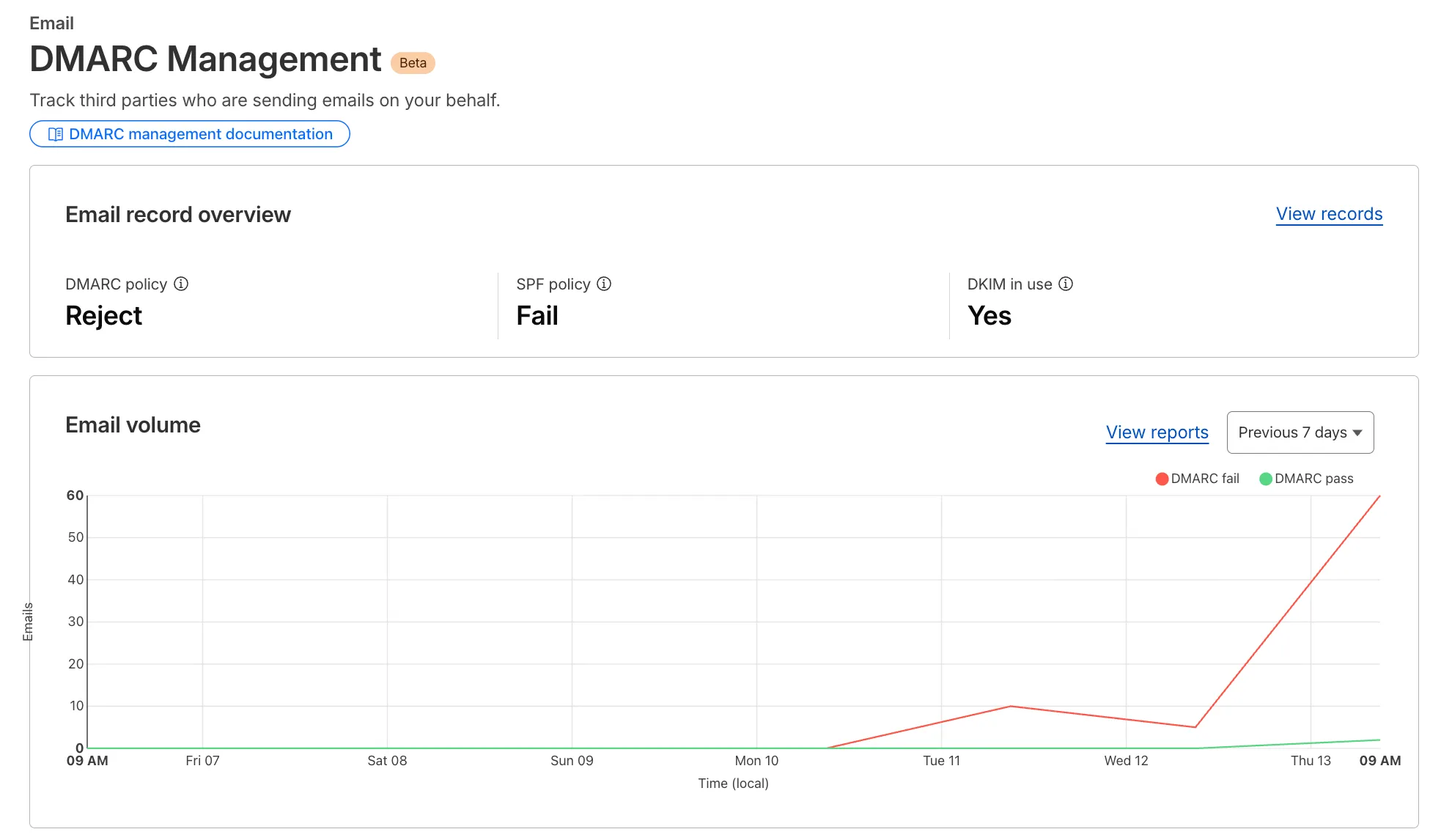
I also enabled a DMARC (Domain-based Message Authentication, Reporting & Conformance) record, initially in p=quarantine (send to spam) mode, and integrated it with a DMARC management service (Cloudflare in my case). I also had a catch-all email address configured.
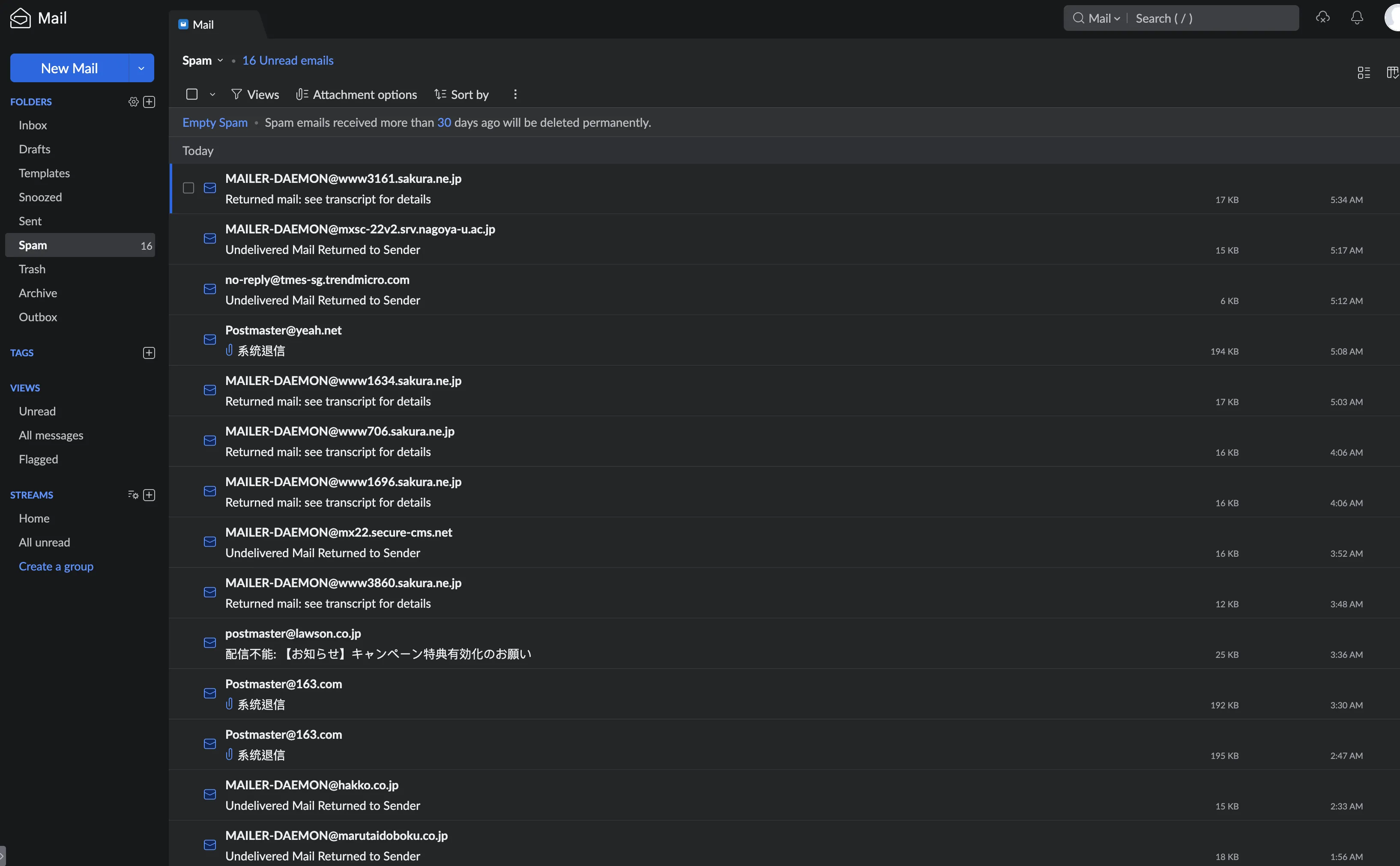
It wasn’t long before my DMARC reports started telling a story: a flood of email purporting to be from my domain, originating from a dizzying array of compromised “zombie” IP addresses around the globe. These were hitting a vast, disparate list of recipients, from university addresses to international companies.
I was a victim of domain spoofing.
Understanding the Invisible Threat
This scenario reveals several critical points:
- Every Domain is a Target: This isn’t just for big brands. Any registered domain is a potential target for spammers. My public profiles might have accelerated discovery, but the risk was always there.
- Spammers Use Botnets: That wide range of IPs is a “botnet” – a network of thousands of compromised devices (laptops, phones, etc.) controlled by a single spammer.
- Leaked Email Lists: The diverse recipient list comes from years of aggregated data breaches. The spammer is simply blasting a colossal, often outdated, list.
- Why You Might Not Notice: Before setting up DMARC reporting, these spoofing attempts are largely invisible. DMARC simply turns on the lights, revealing the constant battle happening behind the scenes.
The Problem with p=quarantine and ~all
My initial p=quarantine policy and ~all (softfail) SPF record had a critical flaw:
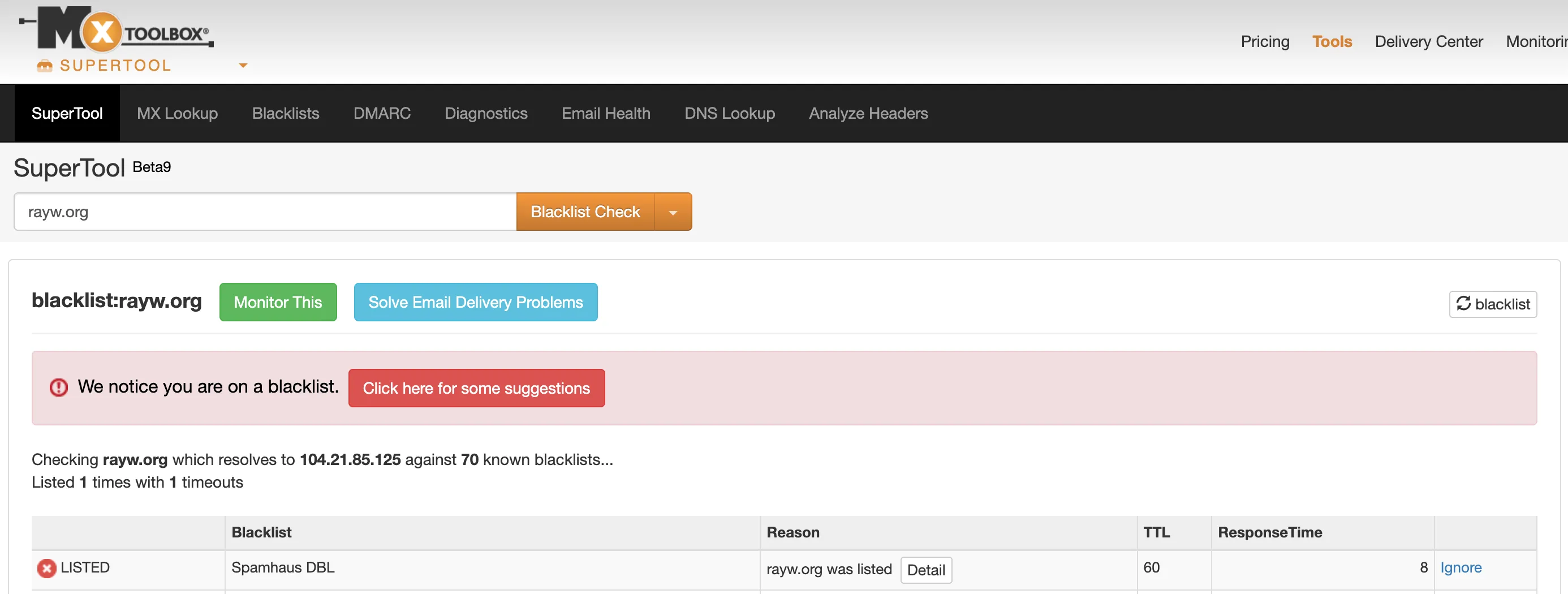
- Spam Still Delivered (to Junk): The spam was still being delivered to spam folders. This meant Spamhaus’s global spam traps were still receiving mail from my domain.
- Blacklisting: Because of this, my domain eventually landed on the Spamhaus DBL (Domain Block List), signaling to the world that my domain was a source of abuse.
The Solution: Taking Command of Your Domain
The key to stopping domain spoofing is to move from suggestion (~all, p=quarantine) to command (-all, p=reject). Here is the process for domains that do or might send legitimate email.
Step 1: Analyze Your DMARC Reports (The Safety Check)
This is the most critical step before enforcing a reject policy. For 1-2 weeks, use a p=quarantine policy and analyze the reports (like the ones in your Cloudflare dashboard).
You must confirm that all your legitimate email services (your email provider, any marketing platforms, etc.) are showing as “Passing” or “Aligned.” If you see legitimate services failing, you must fix their SPF/DKIM setup first.
Step 2: Enforce Your p=reject and -all Policies
Once you are 100% confident that all your good email is passing, it’s time to lock the door. Go into your DNS settings and upgrade your records.
-
For your SPF record:
- Change from:
v=spf1 include:your-email-provider.com ~all - Change to:
v=spf1 include:your-email-provider.com -all - Why: The
-all(Hardfail) is a direct command to reject any sender not on your list.
- Change from:
-
For your DMARC record:
- Change from:
v=DMARC1; p=quarantine; rua=... - Change to:
v=DMARC1; p=reject; sp=reject; adkim=s; aspf=s; rua=... - Why:
p=rejecttells servers to block any email that fails authentication. The other flags (sp=reject,adkim=s,aspf=s) add strict rules for subdomains and alignment, closing common spam loopholes.
- Change from:
Step 3: Request Delisting (If Blacklisted)
If your domain is on Spamhaus or similar lists, visit their site, look up your domain, and follow their delisting process. Crucially, when they ask what you’ve done to fix it, point to your new p=reject DMARC and -all SPF policies. Your robust authentication is your proof.
The “Secure Vault” Method: For Non-Sending Domains
If you have domains that you do not use to send any email (e.g., parked domains, domains that just redirect, or domains you’re reserving for the future), you can skip the analysis and apply the most secure policy immediately.
This is a “placeholder” or “null” policy that tells the world this domain sends zero email.
As documented in Cloudflare’s guide “How to protect domains that do not send emails”, you should set the following three records:
1. The SPF “Reject All” Record:
- Host:
@ - Type:
TXT - Value:
v=spf1 -all- Why: This record explicitly states that no IPs are authorized to send email for this domain.
2. The DKIM “No Public Key” Record:
- Host:
*._domainkey - Type:
TXT - Value:
v=DKIM1; p=- Why: This record signals to mail servers that no valid DKIM keys exist, so any email claiming to be from this domain will fail DKIM authentication.
3. The DMARC “Reject All” Record:
- Host:
_dmarc - Type:
TXT - Value:
v=DMARC1; p=reject; sp=reject; adkim=s; aspf=s- Why: This tells servers to reject any unauthenticated email from this domain (
p=reject) or any of its subdomains (sp=reject).
- Why: This tells servers to reject any unauthenticated email from this domain (
This combination makes your non-sending domain a useless target for spammers.
Final Thoughts: Secure Your Domain Today!
Domain spoofing is an omnipresent threat. By implementing strong SPF, DKIM, and especially an enforced DMARC p=reject policy, you are not only protecting recipients from spam but also safeguarding your own domain’s reputation from invisible attacks. Don’t wait until you’re blacklisted; proactively secure your domain today.